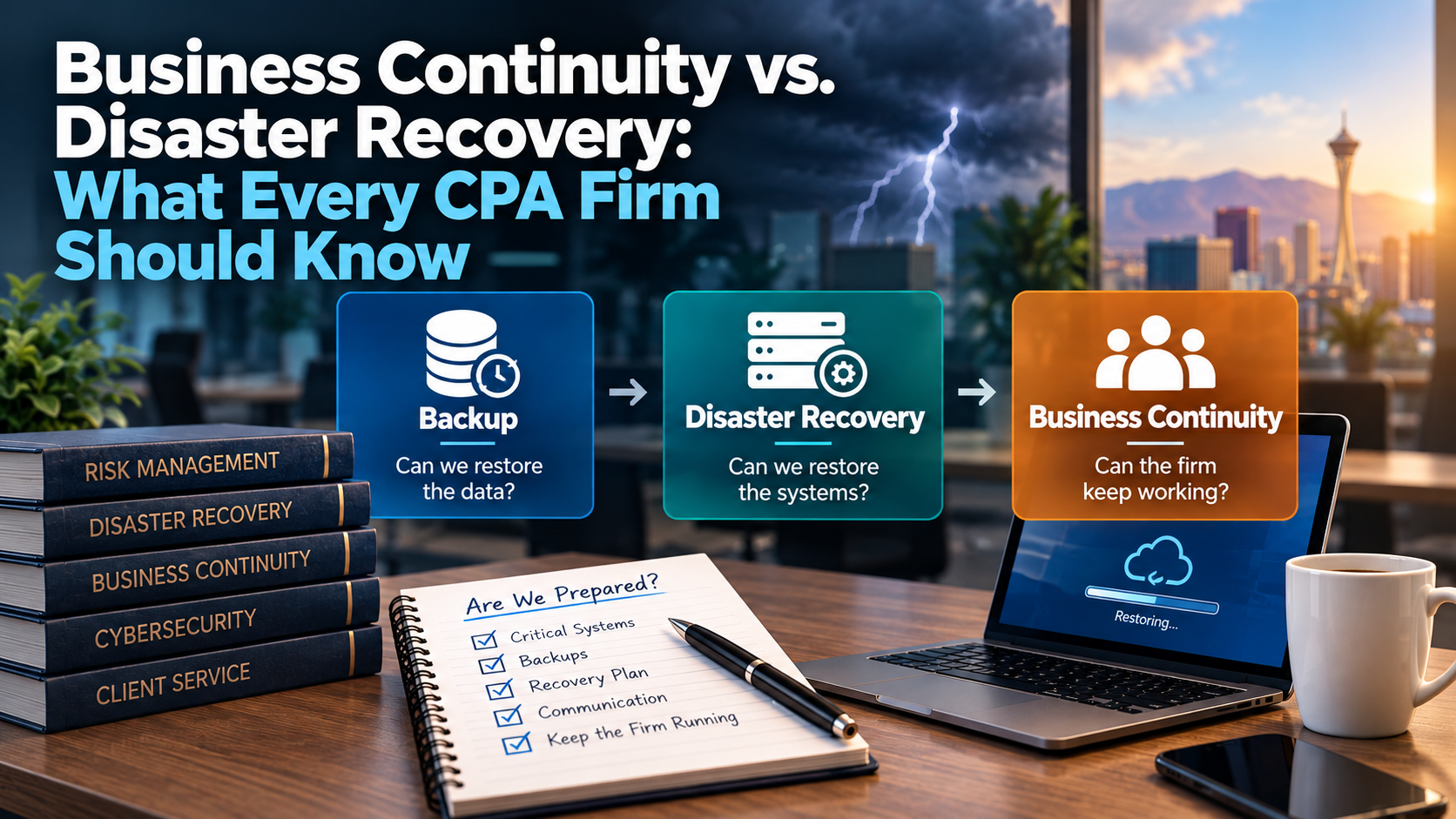
Business continuity and disaster recovery are related, but they are not the same thing. Disaster recovery focuses on restoring technology systems after a disruption, while business continuity focuses on keeping the CPA firm operating during and after that disruption.
For a CPA firm with 10 to 50 employees, this distinction matters because having backups does not automatically mean the firm can continue serving clients during tax season, recover a server quickly, access Microsoft 365, use tax applications, communicate with employees, or respond to a cybersecurity incident.
A practical plan should answer three questions:
- What systems and data must be recovered?
- How quickly does the firm need them back?
- How will the firm continue working while recovery is happening?
The strongest CPA firms do not treat backup, disaster recovery, and business continuity as interchangeable terms. They define each one clearly, assign responsibilities, and test whether their assumptions match reality.
Why This Matters for CPA Firms
CPA firms operate under deadlines.
A technology disruption that might be inconvenient for another business can become a serious operational problem for an accounting firm during a filing period.
Imagine one of these scenarios:
- The firm’s main server fails during tax season.
- Microsoft 365 access is unavailable for several hours.
- A hosted desktop provider has an outage.
- A ransomware incident affects shared files.
- A tax application cannot be accessed.
- A client portal is unavailable.
- The office internet connection fails.
- A key scanner or multifunction printer stops working.
- A former employee account is misused.
- A laptop containing client documents is lost or stolen.
Each scenario raises different questions.
Some are technology recovery questions.
Some are communication questions.
Some are cybersecurity questions.
Some are vendor-management questions.
Some are business continuity questions.
That is why CPA firms need more than a simple statement that “we have backups.”
Backups are important.
But they are only one part of a broader continuity strategy.
The Three Concepts CPA Firms Should Separate
Before building a plan, it helps to separate three related but different concepts:
- Backup
- Disaster Recovery
- Business Continuity
These terms often appear together in technology conversations, but each one answers a different question.
Backup: Can We Restore the Data?
Backup is the process of creating copies of data so information can be recovered after deletion, corruption, hardware failure, ransomware, accidental changes, or other disruption.
A backup strategy may protect:
- Local servers
- File shares
- Databases
- Workstations
- Microsoft 365
- Hosted environments
- Tax applications
- Accounting applications
- Document management systems
- Client portal data
- Cloud platforms
The exact scope depends on where the firm’s data lives.
That detail is critical.
A CPA firm may assume its data is backed up because it uses cloud applications or hosted platforms. But each system may have different recovery capabilities, retention settings, vendor responsibilities, and limitations.
The firm should know:
- What is backed up
- What is not backed up
- How often backups occur
- How long backups are retained
- Where backup copies are stored
- Who monitors failures
- Who performs restores
- Whether restores have been tested
A backup is not useful because it exists.
It is useful because it can be restored when needed.
Disaster Recovery: Can We Restore the Systems?
Disaster recovery goes beyond individual files.
It focuses on restoring systems, applications, infrastructure, and access after a significant disruption.
For a CPA firm, disaster recovery may involve restoring:
- A failed server
- A hosted desktop environment
- File access
- Tax application access
- Accounting application access
- Microsoft 365 access
- Network infrastructure
- Remote access
- Backup systems
- Security tools
- Workstations
- Critical vendor connections
A disaster recovery plan should answer:
- Which systems are most critical?
- In what order should systems be restored?
- Who initiates recovery?
- Who contacts vendors?
- Who communicates with employees?
- What recovery tools are available?
- How long will restoration take?
- What systems depend on other systems?
- What decisions must leadership make?
For example, restoring a file from backup is very different from restoring an entire server that supports tax applications, file access, permissions, and remote connectivity.
That is why disaster recovery planning should be tied to actual business workflows.
Business Continuity: Can the Firm Keep Working?
Business continuity focuses on keeping the firm operational during disruption.
It asks a broader question:
“How will we continue serving clients while technology is being restored?”
That may involve:
- Alternate communication methods
- Remote-work procedures
- Backup internet connectivity
- Temporary devices
- Manual workarounds
- Vendor escalation contacts
- Prioritized client-service workflows
- Employee communication plans
- Leadership decision-making procedures
- Temporary access to critical documents
- Cybersecurity incident communication
- Post-incident recovery steps
Business continuity is not only about restoring systems.
It is about continuing the business.
For a CPA firm, that distinction is especially important during tax season. If employees cannot access a tax application for several hours, the technology question is only part of the issue.
The business also needs to know:
- Which work can continue?
- Which employees are affected?
- Which clients need communication?
- Which deadlines are at risk?
- Which vendors should be contacted?
- Who is coordinating the response?
- What information should employees avoid sending insecurely as a workaround?
Business continuity planning helps prevent confusion when pressure is high.
A Simple Way to Think About the Difference
Here is the simplest distinction:
| Concept | Main Question | Example |
| Backup | Can we restore the data? | Recovering deleted client files |
| Disaster Recovery | Can we restore the systems? | Restoring a failed server or hosted desktop environment |
| Business Continuity | Can the firm keep working? | Continuing client service while systems are restored |
All three matter.
But they are not interchangeable.
A firm can have backups without a complete disaster recovery plan.
A firm can have disaster recovery tools without a business continuity process.
A firm can have a business continuity idea without testing whether the technology supports it.
The goal is to connect all three.
Why “We Have Backups” Is Not Enough
Many CPA firms believe they are protected because backups are in place.
That may be true.
Or it may only be partially true.
The problem is that the phrase “we have backups” does not answer enough questions.
For example:
- Are all critical systems backed up?
- Is Microsoft 365 included?
- Are hosted applications included?
- Is the local server included?
- Are workstation files included?
- Are backups monitored?
- Are failed backups investigated?
- Are backups protected from ransomware?
- Has a restore been tested?
- How long would recovery take?
- Who performs the recovery?
- What happens if the office is unavailable?
- What happens if the backup provider is unreachable?
- What happens if the disruption occurs during tax season?
These questions do not mean backups are unimportant.
They mean backups need context.
A backup strategy should support recovery expectations.
Recovery expectations should support business continuity requirements.
Recovery Time and Recovery Point: Two Numbers Leadership Should Understand
CPA firm leaders do not need to become disaster recovery engineers.
But they should understand two important planning concepts:
- Recovery Time Objective
- Recovery Point Objective
These are often abbreviated as RTO and RPO.
Recovery Time Objective: How Fast Do We Need It Back?
Recovery Time Objective means:
How long can the firm tolerate a system being unavailable?
For example:
- Email may need to be restored quickly.
- A tax application may be critical during filing season.
- A file archive may be less urgent.
- A conference room computer may not matter immediately.
- A document management system may be essential for client service.
Different systems can have different recovery time expectations.
The firm does not need every system restored in the same timeframe.
It needs to know which systems matter most.
Recovery Point Objective: How Much Data Can We Lose?
Recovery Point Objective means:
How much data could the firm tolerate losing if recovery is needed?
For example, if a system is backed up once per day, a failure could potentially require restoring to the previous backup point.
If a system is backed up more frequently, potential data loss may be lower.
The appropriate recovery point depends on the system, the data, the workload, and the business impact.
For a CPA firm, the tolerance for lost work may be very different during tax season than during a slower period.
Not Every System Needs the Same Recovery Priority
One of the biggest mistakes in continuity planning is treating every system as equally important.
That is rarely true.
A CPA firm should categorize systems based on business impact.
Tier 1: Mission-Critical Systems
These are systems the firm needs to continue core operations.
Examples may include:
- Microsoft 365
- Tax applications
- Accounting applications
- File shares
- Document management
- Client portals
- Remote access
- Internet connectivity
- Local servers or hosted desktops
During tax season, more systems may move into this category because the business impact of downtime increases.
Tier 2: Important Systems
These systems matter, but the firm may be able to tolerate short-term disruption.
Examples may include:
- Certain reporting tools
- Internal documentation systems
- Some administrative applications
- Noncritical workstations
- Secondary printers
- Conference room technology
Tier 3: Lower-Priority Systems
These systems should still be managed, but they are not restored first during a significant event.
Examples may include:
- Archived systems
- Rarely used devices
- Nonessential peripherals
- Low-impact internal tools
The point is not to ignore lower-priority systems.
The point is to avoid wasting recovery time on systems that do not drive the business during an emergency.
Business Impact Should Drive the Plan
Technology planning should follow business priorities.
Before choosing backup tools, disaster recovery services, or business continuity procedures, the firm should identify which functions are most important.
For a CPA firm, those may include:
- Preparing and filing returns
- Communicating with clients
- Accessing client documents
- Processing payroll
- Accessing financial records
- Supporting bookkeeping services
- Meeting regulatory or contractual deadlines
- Maintaining secure remote work
- Protecting confidential information
- Communicating with employees
Each business function depends on technology.
The continuity plan should connect the two.
For example:
If the firm must continue preparing returns, which systems are required?
If employees must work remotely, what authentication and access tools are required?
If client documents must be accessed, where are they stored?
If a system fails, who knows which vendor to call?
That connection between business function and technology dependency is what makes continuity planning useful.
Practical Scenarios: How Backup, Disaster Recovery, and Business Continuity Work Together
The difference between backup, disaster recovery, and business continuity becomes clearer when applied to real operating scenarios.
For CPA firms, the most important question is rarely:
“Do we have a backup?”
The better question is:
“What would actually happen if this system became unavailable?”
A practical plan should describe how the firm would respond to likely disruptions, not just theoretical disasters.
Scenario 1: The Firm’s Main Server Fails During Tax Season
Many CPA firms still rely on a server for file access, applications, authentication, permissions, printing, scanning, or legacy accounting and tax workflows.
A server failure during tax season can create immediate disruption.
Employees may lose access to:
- Shared files
- Tax application data
- Accounting application data
- Document management systems
- Printing or scanning workflows
- Remote access
- Application licensing services
- User authentication
- Internal databases
The Backup Question
The first question is:
Is the server backed up, and can its data be restored?
The firm should know:
- When the last successful backup occurred
- Whether backup jobs have been monitored
- Whether failed backups are investigated
- Whether server recovery has ever been tested
- Where backup copies are stored
- Who performs the recovery
If the backup exists but has never been tested, the firm is relying on an assumption.
The Disaster Recovery Question
The next question is:
Can the server environment be restored quickly enough to meet the firm’s needs?
Restoring a server may involve:
- Replacing or repairing hardware
- Provisioning temporary infrastructure
- Restoring the operating system
- Restoring applications
- Restoring data
- Reconnecting users
- Reconfiguring printers or scanners
- Coordinating with software vendors
- Testing application functionality
- Validating permissions
The recovery process may take hours or days depending on the environment, the backup system, the provider’s capabilities, and the available recovery options.
The Business Continuity Question
The broader question is:
How will the firm continue operating while the server is being restored?
That may include:
- Moving some employees to cloud-based tools temporarily
- Prioritizing the most urgent client work
- Communicating with staff about affected systems
- Identifying which deadlines are at risk
- Using alternate access methods where appropriate
- Coordinating with software vendors
- Assigning leadership responsibility for decisions
- Avoiding insecure workarounds
For example, employees may be tempted to email client files to personal accounts or store sensitive documents in unmanaged locations while the server is unavailable.
A business continuity plan should anticipate that pressure and define safer alternatives.
Scenario 2: Microsoft 365 Access Is Disrupted
Microsoft 365 is often central to a CPA firm’s operations.
If users cannot access Microsoft 365, the firm may lose access to:
- Calendars
- Teams
- OneDrive
- SharePoint
- Shared mailboxes
- Office applications
- Authentication for other services
- Client communication history
- Internal collaboration
The disruption may be caused by a Microsoft outage, misconfiguration, compromised accounts, license issues, conditional access problems, authentication problems, or local internet issues.
The Backup Question
The backup question depends on what data or access is affected.
The firm should understand:
- Whether Microsoft 365 data is protected by a separate backup solution
- What retention and recovery capabilities are configured
- Whether deleted email or files can be recovered
- Who performs Microsoft 365 recovery tasks
- Whether former employee data is preserved
- Whether SharePoint and OneDrive data are included in the firm’s recovery planning
The key is not to assume that Microsoft 365 automatically meets every recovery expectation.
Availability, retention, and backup are related but different concepts.
The Disaster Recovery Question
For Microsoft 365, disaster recovery may not look like restoring a physical server.
Instead, it may involve:
- Restoring deleted mailboxes or files
- Recovering SharePoint or OneDrive data
- Reversing malicious mailbox rules
- Restoring account access
- Removing unauthorized access
- Reconfiguring authentication policies
- Coordinating with Microsoft support
- Communicating with users
- Validating account security
The recovery process depends on the nature of the incident.
A broad Microsoft service outage is different from a single compromised user account.
The Business Continuity Question
If Microsoft 365 is unavailable, the firm should know:
- How employees will communicate internally
- How client communication will be handled
- Which work can continue offline
- Whether Teams-dependent meetings can move to another method
- Whether critical documents are available elsewhere
- Who will monitor service status
- Who will communicate updates
- What employees should avoid doing as a workaround
The firm should also consider whether some employees rely on Microsoft 365 for authentication into other applications.
If Microsoft identity services are affected, the disruption may extend beyond email and documents.
Scenario 3: A Hosted Desktop or Cloud Application Has an Outage
Many CPA firms use hosted desktops, hosted servers, vendor-managed cloud platforms, or browser-based SaaS applications.
These services can support remote access and reduce some local infrastructure responsibilities.
But they also introduce vendor dependency.
If the hosted environment is unavailable, employees may lose access to:
- Tax applications
- Accounting applications
- Desktop environments
- Client files
- Document management tools
- Printing workflows
- Integrated applications
- Remote work capabilities
The Backup Question
The firm should understand:
- Who backs up the hosted environment
- What data is included
- How often backups occur
- How long backups are retained
- Whether the firm can request restores
- Whether restore testing has been performed
- What the vendor’s recovery obligations are
- Whether the firm has access to export or retrieve its data
Do not assume that a hosted environment automatically gives the firm the same recovery capabilities it would expect from a dedicated backup strategy.
The contract and vendor documentation matter.
The Disaster Recovery Question
In a hosted environment, the vendor may control much of the recovery process.
That means the firm should know:
- How to contact support
- What service levels apply
- What recovery commitments exist
- Whether there are escalation options
- Whether the MSP can coordinate directly with the vendor
- Whether the outage affects one firm or many customers
- What status updates are available
- Whether alternate access methods exist
A hosted system may simplify some technology management, but it does not eliminate the need for a disaster recovery discussion.
The Business Continuity Question
If the hosted platform is unavailable, the CPA firm needs to know:
- Which work can continue outside the platform
- Whether employees can access documents elsewhere
- Whether clients need communication
- Whether deadlines may be affected
- Who is coordinating with the vendor
- How updates will be shared with staff
- Whether any manual workflow is acceptable
- What should not be done as a workaround
Hosted desktops and cloud applications can be valuable, but they are not magic.
The firm still needs a continuity plan for vendor downtime.
Scenario 4: Ransomware Affects Shared Files or Systems
A ransomware event can combine cybersecurity, disaster recovery, legal, insurance, communication, and business continuity concerns.
It is one of the clearest examples of why backups alone are not enough.
A ransomware event may affect:
- Workstations
- Servers
- Shared files
- Backups
- Microsoft 365 data
- Hosted environments
- User accounts
- Administrative accounts
- Client files
- Application data
The Backup Question
The firm should know:
- Whether affected systems are backed up
- Whether backups were protected from tampering
- Whether backups are clean
- When the last known-good backup occurred
- How much data may be lost
- Whether restoration has been tested
- Who can perform recovery
- Whether backups are isolated from the compromised environment
This is where Recovery Point Objective becomes practical.
If the last clean backup is from the previous night, the firm may lose less work than if the last clean backup is several days old.
The Disaster Recovery Question
Disaster recovery during ransomware is not simply restoring files.
The provider may need to:
- Identify affected systems
- Contain the incident
- Disable compromised accounts
- Remove malicious persistence
- Preserve evidence where appropriate
- Coordinate with cybersecurity specialists
- Coordinate with legal counsel or insurance where applicable
- Restore systems safely
- Validate that restored systems are clean
- Reconnect users
- Monitor for recurrence
Restoring too quickly without understanding the incident can reintroduce risk.
The Business Continuity Question
The business continuity questions may include:
- Who leads the incident response?
- Who contacts legal counsel?
- Who contacts cyber insurance?
- Who communicates with employees?
- What should employees stop doing?
- Which systems are safe to use?
- Which client work can continue?
- Which deadlines are affected?
- How will leadership make decisions?
- How will client communication be handled if needed?
A ransomware event is not only an IT problem.
It is a business event that requires coordination.
Scenario 5: The Office Internet Connection Fails
An internet outage may seem less dramatic than ransomware or server failure, but it can still disrupt a CPA firm significantly.
If the office internet connection fails, employees may lose access to:
- Microsoft 365
- Hosted applications
- Client portals
- Remote desktop systems
- Cloud-based accounting platforms
- Phone systems
- Vendor websites
- Bank portals
- Software updates
- Remote support
Even local systems may be affected if authentication, licensing, or integrations depend on internet access.
The Backup Question
This scenario is not primarily a data-backup issue.
But the firm should understand whether any systems are affected in ways that could create data-loss risk.
For example, if employees begin working offline or storing files locally as a workaround, those files may not be protected by normal backup procedures.
The Disaster Recovery Question
The disaster recovery question is:
How will internet connectivity be restored or replaced?
That may involve:
- Contacting the internet provider
- Failing over to a backup internet connection
- Using cellular backup
- Moving key staff to another location
- Enabling remote work from home
- Reconfiguring network equipment
- Coordinating with phone vendors
The firm should know whether it has a backup internet option and what systems it supports.
The Business Continuity Question
The broader continuity question is:
How will employees keep working if the office is offline?
Options may include:
- Remote work
- Temporary relocation
- Cellular hotspots
- Alternate office space
- Prioritizing cloud-based work
- Using phone-based communication
- Deferring noncritical tasks
The right answer depends on the firm’s work model.
A firm using mostly cloud applications may recover quickly through remote work.
A firm dependent on local servers may need a different plan.
Scenario 6: A Key Scanner or Multifunction Printer Fails
Not every business continuity issue is dramatic.
For a CPA firm, document intake and processing can depend heavily on scanners, multifunction printers, and document management workflows.
If a key scanner fails during tax season, employees may be unable to process client documents efficiently.
The Backup Question
This is usually not about data backup, unless scanned documents are being stored locally or temporarily before being uploaded into a document system.
The firm should understand where scanned documents are stored and whether temporary storage locations are protected.
The Disaster Recovery Question
The recovery question is:
How will scanning capability be restored?
That may involve:
- Troubleshooting the device
- Contacting the copier vendor
- Reconfiguring scan-to-email or scan-to-folder settings
- Using a backup device
- Updating drivers
- Reviewing network connectivity
- Coordinating with document management software support
The Business Continuity Question
The business continuity question is:
How will document workflows continue while the device is unavailable?
Options may include:
- Using another scanner
- Temporarily routing documents to a different office workflow
- Assigning scanning to specific workstations
- Using secure digital intake through a client portal
- Prioritizing urgent documents
- Communicating the temporary process to staff
Small technology issues can become major operational bottlenecks during tax season.
Continuity planning should include practical workflow dependencies, not only major disasters.
Scenario 7: A Key Employee Is Unavailable
Business continuity is not limited to systems.
People matter too.
If only one person knows how to contact the tax software vendor, access the domain registrar, manage Microsoft 365, approve emergency technology decisions, or coordinate with the MSP, the firm has a continuity risk.
A key employee may be unavailable due to vacation, illness, family emergency, departure, or competing deadline pressure.
The Backup Question
This is not a technical backup issue.
But documentation acts as a form of operational backup.
The firm should know where key information is stored, including:
- Vendor contacts
- Account numbers
- Administrative contacts
- Support procedures
- Escalation lists
- Software renewal information
- Backup procedures
- Incident contacts
- Technology roadmap
- Contract records
The Disaster Recovery Question
The recovery question is:
Can the firm continue managing technology decisions without relying on one person’s memory?
If the answer is no, documentation should be improved.
The Business Continuity Question
The continuity question is:
Who can make decisions and coordinate response when the usual person is unavailable?
The firm should define backup decision-makers for:
- Technology approvals
- Vendor escalation
- Employee communication
- Client communication
- Cybersecurity incidents
- Emergency spending
- MSP coordination
A continuity plan should include people, not just platforms.
Practical Lesson: Different Disruptions Require Different Responses
These scenarios show why business continuity and disaster recovery should not be reduced to one generic plan.
A server failure, Microsoft 365 issue, hosted desktop outage, ransomware incident, internet failure, scanner problem, and key-person absence require different responses.
However, they all benefit from the same planning discipline:
- Identify critical systems and workflows
- Understand dependencies
- Define recovery expectations
- Document responsibilities
- Confirm vendor contacts
- Test assumptions
- Communicate clearly
- Prioritize business impact
That discipline makes the firm more resilient.
It also makes technology conversations more practical.
Instead of asking whether the firm is “covered,” leadership can ask:
“Covered for what scenario, with what recovery expectation, and with what continuity plan?”
CPA Firm Business Continuity and Disaster Recovery Checklist
Use this checklist to evaluate whether your CPA firm understands the difference between backup, disaster recovery, and business continuity.
Critical Systems and Workflows
- Identify mission-critical systems
- Identify important but noncritical systems
- Identify lower-priority systems
- Document which business functions depend on each system
- Identify tax-season-specific dependencies
- Identify remote-work dependencies
- Identify client-facing systems
- Identify internal communication systems
- Identify vendor-managed platforms
- Identify systems that depend on Microsoft 365 authentication
Backup
- Document what systems are backed up
- Document what systems are not backed up
- Confirm backup frequency
- Confirm backup retention
- Confirm backup storage location
- Confirm whether backups are monitored
- Confirm who receives backup alerts
- Confirm failed backups are investigated
- Confirm backups are protected from tampering
- Confirm restore testing is performed
Disaster Recovery
- Identify which systems must be restored first
- Define recovery expectations for critical systems
- Document recovery procedures
- Confirm who initiates recovery
- Confirm who contacts vendors
- Confirm who communicates with employees
- Review server recovery procedures
- Review Microsoft 365 recovery procedures
- Review hosted desktop recovery responsibilities
- Review ransomware recovery procedures
Business Continuity
- Define how employees will communicate during disruption
- Define how leadership decisions will be made
- Identify alternate work locations or remote-work options
- Identify backup internet options
- Identify temporary device options
- Identify manual or alternate workflows
- Define which client work must be prioritized
- Define how client communication will be handled
- Define what workarounds are not acceptable
- Document post-incident review procedures
Vendor and Application Dependencies
- Document tax software vendor contacts
- Document accounting application vendor contacts
- Document hosted desktop or hosting provider contacts
- Document Microsoft support path
- Document internet provider contacts
- Document copier and scanner vendor contacts
- Document client portal vendor contacts
- Document backup vendor contacts
- Document cybersecurity provider contacts
- Confirm whether the MSP can contact vendors on the firm’s behalf
People and Responsibilities
- Identify internal continuity decision-makers
- Identify backup decision-makers
- Identify primary MSP contacts
- Identify cybersecurity escalation contacts
- Identify legal or insurance contacts where appropriate
- Identify who communicates with employees
- Identify who communicates with clients if needed
- Identify who approves emergency spending
- Identify who maintains documentation
- Review responsibilities at least annually
This checklist does not guarantee that every disruption will be easy to manage.
It does help the firm identify whether continuity planning is specific enough to support real decisions during a stressful event.
A Practical Example: Continuity Planning for a 25-Person CPA Firm
Consider a hypothetical 25-person CPA firm in Las Vegas.
The firm uses Microsoft 365, a local server, several tax and accounting applications, a document management platform, client portals, remote access, a hosted application, multifunction printers, and a managed backup solution.
The firm believes it is prepared because backups are running.
During a review, leadership discovers several important gaps:
- The firm does not know when the last restore test occurred.
- Microsoft 365 recovery expectations are undocumented.
- The hosted application provider’s recovery responsibilities are unclear.
- The server backup is monitored, but recovery time has never been discussed.
- The office has no backup internet connection.
- Only one administrator knows the copier vendor escalation process.
- Former employee access to one client portal has not been reviewed.
- Employees do not know what to do if email is unavailable.
- There is no written escalation list for a cybersecurity incident.
- Leadership has not defined which systems must be restored first during tax season.
None of these issues means the firm has no protection.
But they reveal a gap between having technology tools and having a practical continuity plan.
First 30 Days
The firm and its technology partner may start with:
- Documenting mission-critical systems
- Confirming what is backed up
- Reviewing backup alerting and retention
- Performing a restore test
- Reviewing Microsoft 365 retention and recovery expectations
- Documenting vendor contacts
- Identifying recovery priorities
- Creating an employee communication plan for outages
- Reviewing administrative access
- Creating a basic incident escalation list
Next 60 to 90 Days
The firm may then continue with:
- Reviewing server recovery options
- Reviewing hosted application recovery responsibilities
- Evaluating backup internet options
- Testing remote-work procedures
- Clarifying client portal access and recovery
- Creating a scanner and printer continuity plan
- Reviewing cybersecurity incident response coordination
- Updating vendor escalation documentation
- Reviewing continuity expectations before tax season
- Connecting findings to the annual technology budget
Longer-Term Planning
Over the next year, the firm may evaluate:
- Whether its backup solution matches business recovery expectations
- Whether a server, hosted desktop, or cloud strategy should change
- Whether disaster recovery capabilities should be strengthened
- Whether Microsoft 365 backup should be added or adjusted
- Whether remote-work capabilities should be improved
- Whether business continuity planning should become part of annual leadership review
- Whether cybersecurity, insurance, legal, and technology responsibilities are aligned
The value of the planning process is not that the firm becomes immune to disruption.
The value is that leadership understands where the firm is prepared, where assumptions exist, and which improvements should be prioritized.
How Often Should CPA Firms Review Business Continuity and Disaster Recovery?
CPA firms should review business continuity and disaster recovery at least annually, and more often when significant changes occur.
Important triggers may include:
- Before tax season
- After tax season
- Before replacing a server
- Before moving to a hosted desktop
- Before changing tax software
- Before opening or moving offices
- Before changing managed IT providers
- After a cybersecurity incident
- After a significant outage
- After adding major cloud applications
- After changing Microsoft 365 configuration
- After hiring or losing key personnel
A review does not need to be overly complicated.
It should answer:
- What has changed?
- Which systems are now more important?
- Are backups still working?
- Has recovery been tested?
- Have vendor contacts changed?
- Are employees clear on support and escalation?
- Are new risks appearing?
- What needs budget attention?
Business continuity planning should evolve as the firm evolves.
What Should Be Tested?
Testing does not always mean conducting a large disaster simulation.
CPA firms can start with practical tests.
Examples include:
- Restoring a deleted file
- Recovering a folder
- Verifying server backup status
- Reviewing Microsoft 365 recovery steps
- Confirming hosted application recovery procedures with the vendor
- Testing remote access from outside the office
- Testing backup internet or cellular failover
- Running through a ransomware response tabletop exercise
- Confirming employee communication procedures
- Confirming vendor escalation contacts
- Reviewing who can make emergency decisions
The goal is to reduce uncertainty.
A test that reveals a gap is not a failure.
It is useful information.
It gives the firm time to correct the issue before a real disruption occurs.
Frequently Asked Questions About Business Continuity and Disaster Recovery for CPA Firms
What is the difference between business continuity and disaster recovery?
Disaster recovery focuses on restoring technology systems after a disruption.
Business continuity focuses on keeping the firm operating while those systems are being restored.
Backup, disaster recovery, and business continuity are related, but they answer different questions.
Backup asks, “Can we restore the data?”
Disaster recovery asks, “Can we restore the systems?”
Business continuity asks, “Can the firm keep working?”
Is backup the same as disaster recovery?
No.
Backup creates recoverable copies of data.
Disaster recovery focuses on restoring systems, applications, access, infrastructure, and workflows after a significant event.
A firm can have backups without knowing how quickly systems can be restored.
That is why restore testing and recovery planning matter.
Is Microsoft 365 backed up automatically?
Microsoft 365 provides cloud services with built-in availability, retention, and recovery capabilities depending on the service, configuration, license, and settings involved.
That does not automatically mean the firm’s recovery expectations are fully met.
CPA firms should understand what can be recovered, for how long, by whom, and whether a separate Microsoft 365 backup solution is appropriate.
Do CPA firms need business continuity planning if they use cloud applications?
Yes.
Cloud applications can reduce some local infrastructure risks, but they do not eliminate business continuity needs.
CPA firms still need to understand vendor responsibilities, user access, internet dependencies, authentication, data recovery, outage communication, and alternate workflows.
Cloud changes the continuity conversation.
It does not eliminate it.
How often should CPA firms test backups?
Backup testing should occur on a recurring schedule appropriate to the importance of the system.
A mission-critical server or document system should receive more attention than a low-impact archive.
At minimum, CPA firms should avoid going years without verifying that important data can actually be restored.
What systems should be included in a CPA firm continuity plan?
A CPA firm continuity plan should consider Microsoft 365, email, tax applications, accounting applications, file shares, local servers, hosted desktops, client portals, document management systems, remote access, internet connectivity, phone systems, printers, scanners, backup systems, cybersecurity tools, and key vendor relationships.
The exact list depends on how the firm operates.
What is RTO?
RTO stands for Recovery Time Objective.
It describes how long the firm can tolerate a system being unavailable.
For example, the acceptable downtime for email during tax season may be very different from the acceptable downtime for a rarely used archive.
What is RPO?
RPO stands for Recovery Point Objective.
It describes how much data the firm can tolerate losing if recovery is required.
For example, a system backed up once per day may have a different potential data-loss window than a system backed up more frequently.
Should business continuity planning include cybersecurity incidents?
Yes.
Cybersecurity incidents such as ransomware, account compromise, data theft, or malicious deletion can disrupt operations.
A continuity plan should identify who leads the response, who contacts legal counsel or insurance where appropriate, who communicates with employees, which systems are safe to use, and how recovery decisions will be made.
What is the first step for a CPA firm that has no continuity plan?
Start by identifying mission-critical systems and workflows.
Then document what is backed up, how recovery would work, who is responsible, which vendors are involved, and how the firm would communicate during disruption.
The first goal is visibility, not perfection.
Key Takeaways
Business continuity and disaster recovery are related, but they are not the same thing.
CPA firms should remember these principles:
- Backup answers whether data can be restored.
The firm should know what is backed up, how often, how long it is retained, and whether restore testing occurs. - Disaster recovery answers whether systems can be restored.
Recovery planning should include servers, Microsoft 365, hosted environments, applications, remote access, and vendor responsibilities. - Business continuity answers whether the firm can keep working.
Continuity planning should include communication, alternate workflows, leadership decisions, remote work, client priorities, and safe workarounds. - Recovery priorities should follow business impact.
Not every system needs the same recovery target. Tax-season systems may require different treatment than lower-priority tools. - Cloud does not eliminate continuity planning.
Hosted desktops, SaaS platforms, Microsoft 365, and cloud applications still require access, recovery, vendor, and outage planning. - Testing reduces assumptions.
A backup or recovery plan is more useful when the firm has verified that it works. - Continuity planning should evolve.
Review the plan before tax season, after major technology changes, after provider transitions, and whenever the business changes.
The objective is not to predict every possible disruption.
The objective is to make better decisions before disruption occurs.
Ready to Strengthen Your CPA Firm’s Continuity Plan?
A strong continuity strategy helps your CPA firm protect client service, employee productivity, and operational confidence when technology problems occur.
It starts by understanding the difference between backup, disaster recovery, and business continuity.
Then it connects those concepts to the systems, vendors, people, and workflows your firm depends on.
At ANAX Business Technology, we help CPA firms evaluate their backup strategy, disaster recovery capabilities, Microsoft 365 recovery expectations, hosted application dependencies, cybersecurity risks, and business continuity planning as part of a broader technology strategy.
Our U.S.-based team members live and work in the Las Vegas valley, allowing us to combine responsive local support with long-term technology planning. We believe the best technology partnerships are built on accessibility, accountability, transparency, and practical guidance that supports how your firm actually operates.
Whether you are preparing for tax season, reviewing your backup strategy, evaluating disaster recovery options, or planning next year’s technology budget, we can help you make informed decisions.
Schedule your Initial Consultation with ANAX Business Technology to discuss your firm’s continuity needs and build a practical plan for reducing avoidable disruption.