Technology rarely fails according to your budget schedule.
A five-year-old laptop doesn't check with the managing partner before its battery fails. An aging firewall doesn't wait until after a major deadline to develop a problem. And a server that has been "running fine for years" can become considerably more expensive once its warranty expires or its operating system reaches end of support.
That's why successful law firms shouldn't wait for technology to fail before replacing it.
Instead, hardware replacement should be part of a predictable technology lifecycle plan.
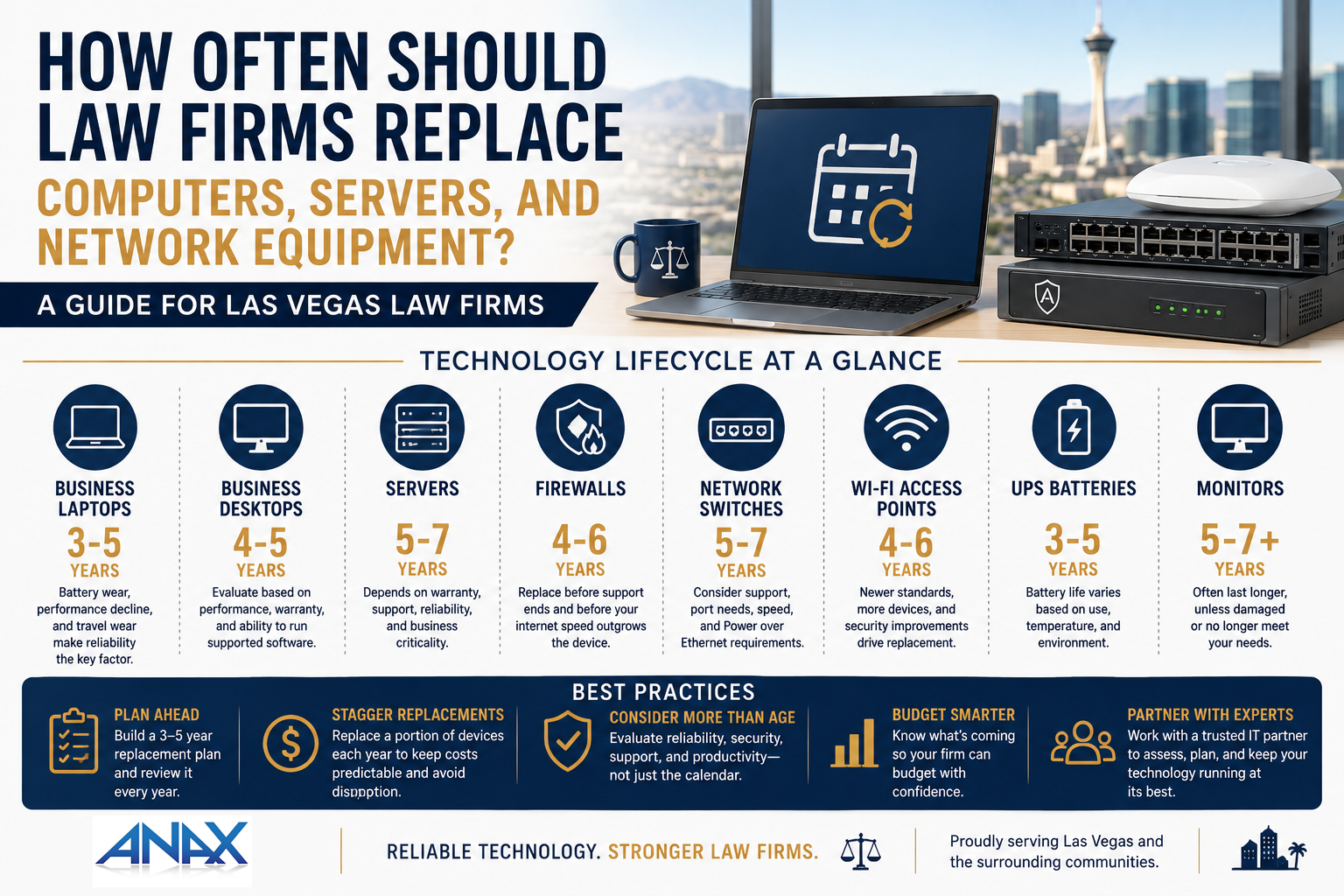
For most law firms, business computers should generally be evaluated for replacement after 3 to 5 years, while servers and network infrastructure may operate effectively for 5 to 7 years depending on the equipment, warranty coverage, performance requirements, and manufacturer support.
Those aren't expiration dates.
They're planning ranges.
The objective is to replace technology at the point where reliability, security, performance, and supportability begin creating more business risk than the equipment is worth.
Here's how Las Vegas law firms can build a practical replacement strategy.
Quick Answer: How Often Should Law Firms Replace IT Equipment?
A useful starting point for technology budgeting is:
| Technology | Typical Planning Range |
| Business laptops | 3–5 years |
| Business desktops | 4–5 years |
| Servers | 5–7 years |
| Firewalls | 4–6 years |
| Network switches | 5–7 years |
| Wi-Fi access points | 4–6 years |
| UPS / battery backup | 3–5 years for batteries, depending on use and conditions |
| Monitors | 5–7+ years |
These ranges shouldn't replace an assessment of the actual equipment.
A high-quality workstation used by an administrative employee may remain productive longer than a laptop used heavily by an attorney who travels frequently.
Likewise, a network switch may continue functioning for years while no longer receiving the manufacturer support or security updates your firm requires.
A better question than "Does it still turn on?" is:
"Is this equipment still reliable, secure, supported, and appropriate for the work we're asking it to do?"
Why Waiting Until Equipment Fails Can Cost More
It's tempting to keep technology until it stops working.
After all, replacing a functioning computer can feel wasteful.
But hardware failure isn't the only cost associated with aging technology.
Older equipment can contribute to:
- Slower employee productivity
- Increased support requests
- Unexpected downtime
- Battery problems
- Compatibility issues
- Expired warranties
- Unsupported operating systems
- Security concerns
- Emergency replacement costs
Consider a computer that freezes for five minutes twice per day.
That may not sound like a major technology problem.
But if an attorney or staff member loses ten productive minutes every workday, that adds up to roughly 40 hours of lost productivity over a 240-day working year.
Suddenly, keeping the old computer doesn't look quite as inexpensive.
The purchase price of new equipment is only one side of the calculation.
The other is the cost of keeping unreliable equipment in service.
-
How Often Should Law Firms Replace Laptops?
For most business laptops, 3 to 5 years is a reasonable planning range.
Laptops experience more physical wear than most other business technology.
They're carried between offices and conference rooms.
They travel home.
They go to court.
They spend hours connected to docking stations and then get placed into bags.
Over time, batteries degrade, components wear, and newer software places greater demands on the hardware.
Signs a Laptop May Need Replacement
Consider replacing a laptop sooner if:
- Battery life has deteriorated significantly
- The computer regularly freezes or slows down
- Repairs are becoming frequent
- It can't support the current operating system
- The manufacturer's warranty has expired and reliability is declining
- Employees regularly complain about performance
- The device no longer meets your firm's security requirements
For attorneys who travel frequently or depend heavily on their laptops, reliability may justify replacing equipment closer to the beginning of the range.
A computer that fails while someone is preparing for a hearing has a very different business impact than a lightly used spare workstation.
-
How Often Should Law Firms Replace Desktop Computers?
Desktop computers often experience less physical wear than laptops and can sometimes remain productive slightly longer.
A reasonable planning range is approximately 4 to 5 years.
Again, age shouldn't be the only deciding factor.
Performance matters.
A four-year-old business-class desktop with adequate memory and storage may still perform perfectly well.
Another computer of the same age may struggle with modern applications, large documents, videoconferencing, multiple monitors, or increasingly demanding browser-based software.
Don't Replace Computers Based on Age Alone
This is an important distinction.
A lifecycle plan doesn't mean:
"This computer turned four years old today, so throw it away."
Instead, age should trigger an evaluation.
Ask:
- Is performance still acceptable?
- Is the operating system supported?
- Does the hardware meet current security requirements?
- Is warranty coverage still available?
- Has the device required repeated repairs?
- Does it support the employee's current workload?
If the answers are positive, extending the device's useful life may make sense.
If several answers are negative, replacement becomes easier to justify.
-
How Often Should Law Firms Replace Servers?
Servers require a different approach because the consequences of failure can be much greater.
For organizations that still operate physical servers onsite, a typical planning range may be approximately 5 to 7 years.
But a server shouldn't automatically remain in production simply because it hasn't reached year seven.
Several factors matter:
- Manufacturer warranty and support
- Operating system support
- Hardware reliability
- Available replacement parts
- Storage capacity
- Application requirements
- Backup and recovery capabilities
- Business criticality
For a server supporting an essential application or storing important business information, warranty coverage becomes particularly important.
If critical hardware fails, you don't want the recovery plan to begin with:
"Let's see if we can find a replacement part."
What About Firms Moving to the Cloud?
Many law firms now rely increasingly on Microsoft 365 and cloud-based practice management applications.
As a result, some firms may need fewer onsite servers than they did a decade ago.
When an aging server approaches replacement, don't automatically purchase another one.
Ask:
"Do we still need this server?"
Sometimes the correct lifecycle decision is replacement.
Sometimes it's migration.
And sometimes it's retiring the server entirely.
Technology lifecycle planning should consider where your business is going, not simply recreate the environment you already have.
Replacement Planning Is Really Risk Management
At first glance, replacing computers and servers sounds like a purchasing decision.
It's actually a risk-management decision.
For each piece of equipment, you're balancing four factors:
- Reliability
How likely is this equipment to continue operating without disrupting employees?
- Security
Can it run supported operating systems, firmware, and security tools?
- Supportability
Does the manufacturer still support it, and can replacement parts or technical assistance be obtained?
- Productivity
Does it allow employees to work efficiently?
When equipment begins failing across several of these areas, keeping it becomes increasingly difficult to justify, even if it technically still works.
Don't Replace 25 Computers in the Same Month
Here's one of the most practical lessons in technology lifecycle planning.
Suppose a 25-person law firm buys 25 new computers when it moves into a new office.
Five years later, all 25 machines reach the replacement window at approximately the same time.
That's not a technology emergency.
It's a budgeting problem that could have been predicted years earlier.
A better approach is to create a rolling replacement schedule.
For example, instead of replacing 25 computers at once, the firm might plan to replace approximately 5 computers per year over five years, adjusting the schedule based on condition and business needs.
That approach provides several advantages:
- More predictable annual technology spending
- Fewer emergency purchases
- More consistent employee performance
- Less disruption from large replacement projects
- Easier budgeting for firm leadership
The exact schedule will differ from firm to firm.
The principle is what matters:
Technology replacement should be planned before technology failure makes the decision for you.
-
How Often Should Law Firms Replace Firewalls?
A firewall is one of the most important pieces of security infrastructure in your office.
It helps control traffic entering and leaving your network and may provide additional security capabilities such as intrusion prevention, web filtering, VPN connectivity, and threat detection.
For many businesses, 4 to 6 years is a reasonable planning range for firewall replacement.
But age isn't the only consideration.
A firewall may need to be replaced sooner if:
- The manufacturer no longer supports it
- Security updates or firmware are no longer available
- Its security subscriptions have expired
- Internet speeds have outgrown its capabilities
- New security features require more powerful hardware
- VPN performance has become inadequate
- The device is becoming unreliable
One of the most important considerations is manufacturer support.
A firewall that still powers on but no longer receives security updates isn't necessarily an asset worth keeping.
This is a good example of why "it still works" shouldn't be the only standard used when evaluating business technology.
Your Internet Connection Can Outgrow Your Firewall
There's another issue law firms sometimes overlook.
Suppose your office upgrades from a 500 Mbps internet connection to a multi-gigabit fiber connection.
That's great.
But can your existing firewall actually inspect and process traffic at those speeds with its security features enabled?
If not, you may be paying for internet performance your network can't fully use.
When upgrading internet service, your technology partner should verify that the firewall and other network equipment can support the new connection.
-
How Often Should Law Firms Replace Network Switches?
Network switches connect much of the technology inside your office.
Computers.
Phones.
Wireless access points.
Servers.
Printers.
Other network devices.
Because switches can operate quietly for years, they're easy to forget when planning technology replacements.
A typical planning range for business-class network switches is approximately 5 to 7 years, although high-quality equipment may remain useful longer when it continues to be supported and meets the organization's needs.
Factors to consider include:
- Manufacturer support
- Firmware availability
- Port capacity
- Network speed
- Power over Ethernet requirements
- Reliability
- Warranty coverage
- Future expansion plans
For example, your existing switch may technically work perfectly while lacking the power capacity required for newer wireless access points or phones.
In that case, replacement isn't about failure.
It's about whether the infrastructure can support where your technology is going next.
-
How Often Should Law Firms Replace Wi-Fi Access Points?
Wireless technology evolves faster than many other parts of the network.
For that reason, Wi-Fi access points often deserve evaluation after approximately 4 to 6 years.
That doesn't mean an access point suddenly becomes unusable on its sixth birthday.
Instead, newer wireless standards, changing device requirements, increased density, and security improvements can eventually make older equipment less effective.
Signs that your Wi-Fi environment may need attention include:
- Frequent connection problems
- Dead zones
- Poor performance in conference rooms
- Slow speeds despite fast internet service
- Problems as more devices connect
- Older wireless standards
- Equipment that no longer receives updates
For law firms, reliable wireless connectivity has become increasingly important as laptops, smartphones, conference-room systems, and other devices depend on Wi-Fi throughout the day.
Don't Fix Poor Wi-Fi by Randomly Adding More Access Points
More access points don't automatically create better Wi-Fi.
In some cases, adding equipment without proper planning can create additional interference and performance problems.
Wireless networks should be designed around factors such as:
- Office layout
- Construction materials
- Number of users
- Device density
- Conference-room usage
- Neighboring wireless networks
- Coverage requirements
If your firm moves offices, remodels its space, or significantly increases headcount, it may make sense to reevaluate wireless coverage even if the access points aren't particularly old.
-
How Often Should Law Firms Replace UPS Battery Backup Equipment?
A UPS, or Uninterruptible Power Supply, provides temporary battery power when electrical service is interrupted.
Depending on the environment, a UPS may protect equipment such as:
- Servers
- Firewalls
- Network switches
- Storage systems
- Other critical infrastructure
The UPS itself may remain in service for years, but its batteries are consumable components.
A practical planning range for many UPS batteries is approximately 3 to 5 years, depending on the equipment, battery type, environmental conditions, and usage.
Heat can be especially hard on batteries.
That matters in Las Vegas.
A network closet with inadequate cooling may shorten battery life and potentially affect other technology as well.
Your technology provider should periodically evaluate battery health rather than discovering during a power outage that a UPS can no longer provide meaningful runtime.
Warranty Expiration Should Trigger a Conversation
Warranty coverage deserves more attention in lifecycle planning.
For an employee workstation, operating briefly outside warranty may sometimes be a reasonable business decision.
For a mission-critical server or piece of network infrastructure, the calculation may be very different.
When a warranty approaches expiration, ask:
- How important is this device?
- What happens if it fails tomorrow?
- How quickly could we replace it?
- Are replacement parts readily available?
- Can the warranty be extended?
- Is the equipment still supported by the manufacturer?
- Is replacement already planned in our budget?
Warranty expiration doesn't automatically mean equipment needs to be replaced.
But it should trigger a deliberate decision.
That's much better than discovering the lack of coverage during an emergency.
Repair or Replace? Use the Business Impact Test
When aging technology develops a problem, businesses often ask:
"Can it be repaired?"
That's a reasonable question.
But it shouldn't be the only question.
Instead, ask:
"Does repairing this equipment still make business sense?"
Consider a five-year-old laptop that requires a significant repair.
Even if the repair is possible, you should consider:
- The cost of the repair
- The age of the computer
- Remaining warranty coverage
- Current performance
- Expected remaining lifespan
- Employee downtime
- The cost of replacement
Spending several hundred dollars repairing an older device that was already scheduled for replacement may simply postpone an inevitable purchase.
On the other hand, an inexpensive repair to an otherwise capable machine may extend its useful life economically.
There isn't a universal percentage or dollar amount that determines the answer.
The decision should consider both technical condition and business impact.
The Hidden Cost of Keeping Hardware Too Long
Stretching a computer from year five to year six can look like saving money.
Sometimes it is.
Other times, the savings exist only on the equipment budget.
Older hardware can create costs elsewhere through:
- Additional support tickets
- Employee downtime
- Slower performance
- Emergency repairs
- Compatibility problems
- Increased security risk
- Expedited replacement purchases
This is why the cheapest technology strategy isn't necessarily the one that purchases equipment least often.
The better objective is to find the point where you're getting reasonable value from the equipment without allowing aging technology to interfere with the business.
Standardization Makes Technology Easier to Manage
Lifecycle planning also creates an opportunity to standardize equipment.
Instead of purchasing whatever laptop happens to be available when someone starts, your firm can establish preferred configurations for different roles.
For example:
Standard Business User
A reliable business-class computer designed for everyday productivity, Microsoft 365, practice management applications, and web-based services.
Power User
Additional processing power and memory for employees working with more demanding applications or large datasets.
Mobile Attorney
A business-class laptop emphasizing portability, battery life, docking capability, and reliability.
Standardization can make:
- Purchasing easier
- Support more consistent
- Replacement faster
- Troubleshooting simpler
- Spare equipment more useful
- Budgeting more predictable
It doesn't mean every employee needs exactly the same computer.
It means purchasing technology according to a plan rather than one emergency at a time.
Build the Replacement Schedule Before You Build the Budget
One of the easiest ways to make technology spending more predictable is to maintain an equipment inventory that includes at least:
- Device type
- User or location
- Purchase date
- Warranty expiration
- Expected replacement year
- Current condition
From there, you can look several years ahead.
If you know that 7 laptops, a firewall, and two wireless access points are likely to reach their replacement windows next year, those expenses don't have to be surprises.
They can become part of the firm's annual budget.
And if some of those devices remain reliable enough to extend another year, that's fine.
Move them on the schedule.
The important part is that the decision is being made intentionally.
Lifecycle Planning Should Be Flexible
A good replacement plan isn't rigid.
Think of it as a forecast.
At least annually, review the equipment scheduled for replacement and ask:
Replace now?
Extend another year?
Upgrade?
Migrate to a different solution?
Retire it completely?
That last question is particularly important.
Technology environments change.
An old server may no longer need a replacement because the application it hosted has moved to the cloud.
A physical phone may no longer be necessary for every employee.
A new office layout may require a completely different wireless design.
The purpose of lifecycle planning isn't to perpetually replace old technology with newer versions of the same thing.
It's to make deliberate technology investments based on what your law firm actually needs.
How Do You Build a Technology Replacement Budget?
Once you know the approximate lifecycle of your equipment, technology budgeting becomes much easier.
The objective isn't to predict exactly when every device will fail.
It's to identify when equipment is likely to need attention so your firm can budget for replacements before they become emergencies.
A simple technology lifecycle plan can look three to five years into the future.
Start with an inventory containing:
- Each computer and assigned user
- Purchase date
- Warranty expiration
- Expected replacement year
- Servers
- Firewalls
- Network switches
- Wi-Fi access points
- UPS equipment
- Other business-critical hardware
Then distribute anticipated replacements across future budget years.
The result is a technology forecast that can be reviewed and adjusted annually.
Example: A 10-User Law Firm
Consider a small law firm with 10 employees.
If all 10 computers were purchased at approximately the same time and the firm plans around a five-year lifecycle, replacing everything in year five would create an unnecessary spike in technology spending.
Instead, the firm could gradually move toward replacing approximately:
2 computers per year
A simplified schedule might look like this:
| Year | Planned Endpoint Replacements |
| Year 1 | 2 computers |
| Year 2 | 2 computers |
| Year 3 | 2 computers |
| Year 4 | 2 computers |
| Year 5 | 2 computers |
Infrastructure should then be layered into the same forecast.
For example:
Year 1: 2 computers
Year 2: 2 computers + UPS batteries
Year 3: 2 computers + firewall evaluation
Year 4: 2 computers + Wi-Fi evaluation
Year 5: 2 computers + network switch evaluation
This doesn't mean each device must be replaced in the specified year.
It means leadership knows the expense may be coming and can budget accordingly.
Example: A 25-User Law Firm
Now consider a 25-person firm using the same general five-year endpoint planning cycle.
A reasonable starting point might be:
Approximately 5 computers per year
That creates a much smoother replacement pattern than purchasing 25 computers at once every five years.
| Year | Planned Endpoint Replacements |
| Year 1 | 5 computers |
| Year 2 | 5 computers |
| Year 3 | 5 computers |
| Year 4 | 5 computers |
| Year 5 | 5 computers |
Again, network infrastructure can be staggered around the endpoint schedule.
Perhaps the firewall reaches its replacement window in Year 2.
Wireless access points may be evaluated in Year 3.
A network switch might reach the end of manufacturer support in Year 4.
Rather than encountering three unexpected capital expenses, the firm has visibility into them years in advance.
Example: A 50-User Law Firm
At 50 users, lifecycle planning becomes even more important.
Using a five-year endpoint planning cycle as a starting point would mean approximately:
10 computers per year
But larger firms may want to be more deliberate about which devices are replaced first.
For example, the firm might prioritize:
- Computers experiencing reliability problems
- Devices approaching the end of manufacturer support
- Heavily used attorney laptops
- Computers with expired warranties
- Lower-risk administrative workstations
This allows the firm to balance age with actual business impact.
A 50-user environment will also typically have more infrastructure to consider.
The technology forecast might include:
- Multiple network switches
- Several wireless access points
- Firewall equipment
- UPS systems
- Conference-room technology
- Servers, if still used onsite
- Spare computers
- Additional office locations
At this size, maintaining a documented asset lifecycle becomes much more valuable than relying on memory or waiting for employees to complain.
Don't Forget Growth
There's an important limitation to the examples above.
They assume the number of employees remains relatively stable.
Growing firms need to budget for new equipment and replacement equipment at the same time.
Imagine a 25-person law firm plans to replace five aging computers this year but also expects to hire three employees.
The actual requirement may be closer to:
5 lifecycle replacements + 3 growth devices = 8 computers
That's why technology budgeting should be connected to business planning.
Your IT partner should know if you're:
- Hiring employees
- Adding attorneys
- Opening an office
- Moving locations
- Expanding practice areas
- Increasing remote work
- Implementing new software
Those business decisions often have technology costs attached to them.
Create a 3-to-5-Year Technology Forecast
A practical technology forecast doesn't need to be complicated.
For each upcoming year, identify anticipated expenses in a few categories:
End-User Technology
- Laptops
- Desktops
- Docking stations
- Monitors
- Accessories
Network Infrastructure
- Firewalls
- Switches
- Wi-Fi
- UPS equipment
Server Infrastructure
If applicable:
- Physical servers
- Storage
- Server warranties
- Operating system upgrades
Business Changes
Include anticipated projects such as:
- Office moves
- New locations
- Significant hiring
- Cloud migrations
- New practice management systems
- Conference-room upgrades
Now leadership has visibility into both routine replacement expenses and larger technology initiatives.
A Simple Annual Hardware Planning Process
Technology lifecycle planning doesn't need to become a massive annual project.
Once the inventory exists, your firm and technology partner can review it regularly using a simple process.
Step 1: Review
Identify equipment approaching its expected replacement window.
Step 2: Evaluate
Determine whether each device remains reliable, secure, supported, and productive.
Step 3: Prioritize
Move the highest-risk or highest-impact equipment to the top of the replacement schedule.
Step 4: Budget
Estimate the upcoming year's purchases and include them in the firm's financial planning.
Step 5: Adjust
Extend equipment that's still performing well and accelerate replacement where conditions have changed.
Then repeat the process the following year.
Review → Evaluate → Prioritize → Budget → Adjust
The process matters more than rigidly following an arbitrary replacement date.
Questions to Ask Your Managed IT Provider Every Year
You shouldn't need to inspect serial numbers or research hardware support dates yourself.
Your technology partner should help provide that visibility.
During annual technology planning, ask:
- Which computers should we plan to replace this year?
- Which devices could reasonably remain in service another year?
- Which warranties are expiring?
- Is any equipment approaching end of manufacturer support?
- Are any operating systems approaching end of support?
- Which devices are generating excessive support requests?
- Does our network infrastructure still support our internet speeds and security requirements?
- Are our UPS batteries healthy?
- Do we still need our existing servers?
- Are there technology projects we should budget for next year?
- How will anticipated hiring affect our equipment needs?
Your IT provider should be able to explain why a replacement is recommended.
"Because it's old" isn't a particularly useful answer.
A better recommendation sounds like:
"This laptop is approaching five years old, its warranty has expired, the battery is deteriorating, and the employee has experienced repeated performance problems. We recommend budgeting for replacement this year."
That's a business recommendation leadership can evaluate.
Signs Your Firm Needs Better Lifecycle Planning
Your technology replacement process may need attention if:
- Computers are only replaced after they fail.
- You don't know how old your equipment is.
- Multiple employees regularly complain about slow computers.
- Large hardware purchases routinely come as surprises.
- Warranty expiration dates aren't tracked.
- Unsupported equipment remains in production without a documented reason.
- All of your computers were purchased together and will age out together.
- Network equipment hasn't been reviewed in several years.
- Nobody can explain what technology expenses are likely during the next 12 to 36 months.
These aren't necessarily technology emergencies.
They're signs that your firm has an opportunity to become more proactive.
Don't Let the Calendar Make Every Decision
A five-year-old computer isn't automatically bad.
A three-year-old computer isn't automatically good.
Lifecycle ranges help with planning, but the final decision should consider the equipment's actual condition and business purpose.
A useful four-part test is:
Reliable?
Does it consistently perform without disrupting employees?
Secure?
Can it run supported software and the security tools your firm requires?
Supported?
Does the manufacturer still provide appropriate support, warranties, firmware, or replacement options?
Productive?
Can the employee using it perform their work efficiently?
If the answer to all four is yes, extending the equipment's lifecycle may make financial sense.
If several answers are no, replacement may be less expensive than continuing to maintain it.
Why Las Vegas Law Firms Work With ANAX Business Technology
At ANAX Business Technology, we believe technology expenses should be planned whenever possible, not discovered when something breaks.
Hardware lifecycle planning is part of being a proactive technology partner.
We help clients understand:
- What equipment they have
- How old it is
- What condition it's in
- When warranties expire
- What should be replaced
- What can remain in service
- What expenses are likely in future years
That allows leadership to make informed decisions instead of responding to one technology emergency at a time.
Our U.S.-based team members live and work in the Las Vegas valley, allowing us to combine responsive local support with long-term technology planning.
Our goal isn't to sell clients new equipment simply because something reached a particular age.
It's to help them replace technology at the point where doing so makes good business sense.
Ready to Build a Technology Lifecycle Plan?
If your law firm isn't sure how old its computers and network equipment are, or you're facing a large group of devices that may need replacement soon, ANAX Business Technology can help.
We'll evaluate your existing environment, identify equipment approaching its replacement window, and help you build a practical technology roadmap based on your firm's priorities and budget.
Schedule a consultation with ANAX Business Technology.
Final Thoughts
The best time to decide how you'll replace a computer isn't the morning it stops working.
Technology lifecycle planning turns unpredictable purchases into manageable business expenses.
For most law firms, these planning ranges provide a useful starting point:
- Laptops: 3–5 years
- Desktops: 4–5 years
- Servers: 5–7 years
- Firewalls: 4–6 years
- Network switches: 5–7 years
- Wi-Fi access points: 4–6 years
- UPS batteries: commonly 3–5 years depending on conditions
- Monitors: 5–7+ years
But remember:
These are planning ranges, not expiration dates.
Evaluate equipment based on reliability, security, supportability, and productivity.
Track what you own.
Forecast what you'll need.
Stagger replacements where practical.
Review the plan every year.
Do that consistently, and technology replacement becomes far less surprising and much easier to budget.
That's the difference between reacting to aging technology and managing it strategically.